
Guru Maps Pro & GPS Tracker
Evgen BodunovMaps & Navigation
4.556.00 Reviews
- Version
- 6.1.1
- Installs
- 50.00K
- Age Rating
- Everyone
Screenshots
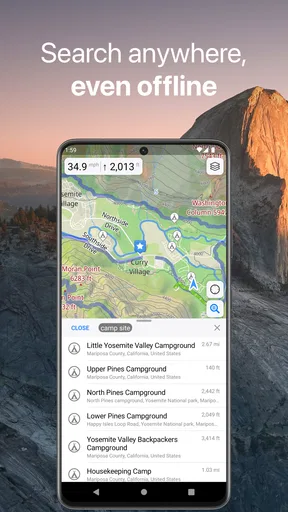
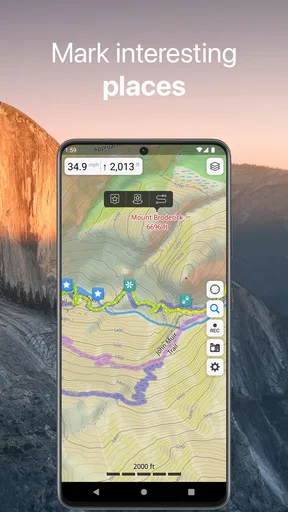
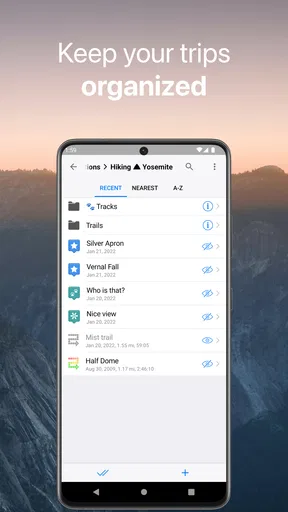
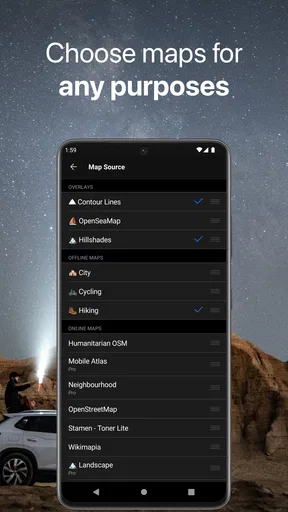
Our Review of Guru Maps Pro & GPS Tracker
 Analysis by Appyee
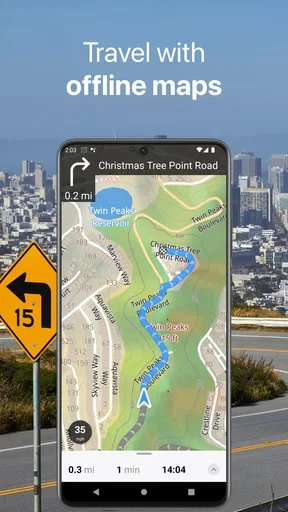
I usually judge a navigation app by one simple question: would I trust it before losing mobile coverage? Guru Maps Pro & GPS Tracker is built around that decision. It belongs to the Maps & Navigation category, and its main appeal is preparing maps in advance so a trip does not depend entirely on a live connection. That makes it interesting for road trips, travel abroad, hiking, and anyone who prefers to plan calmly before leaving home.
My experience with it is less about replacing every map app on a phone and more about choosing the right navigation style. Guru Maps is a paid app from Evgen Bodunov, currently at version 6.1.1, and it supports devices running Android 6.0 or later. It has reached over fifty thousand installs and holds a 4.5 average from around two thousand ratings, which suggests that its offline-first approach has found a committed audience.
The important question is whether that approach suits you. If you only need directions during a normal commute, a familiar online maps service may feel easier. If you want to prepare a route before a journey and keep useful map access when the signal disappears, this app makes a stronger case. I would not install it casually without thinking about how I travel, because its value depends on using its preparation tools rather than opening it only when already lost.
How I would decide whether Guru Maps fits my trips
The first decision criterion is your relationship with internet access. Online navigation is convenient when coverage is reliable, but it can become awkward at borders, in rural areas, underground, or when roaming is expensive. Guru Maps is designed for the person who wants to download what is needed before departure and then navigate with more confidence away from a network connection. That preparation changes the rhythm of a trip: instead of waiting for a map to load beside a roadside, I can make the important choices while still at home.
The second criterion is planning depth. Some people want a quick route from their current position to a destination and nothing more. Others want to look at an area, save places, study roads, and keep a dependable reference while moving between several locations. Guru Maps makes more sense for the second group. It is particularly appealing when the journey itself matters as much as reaching a final address.
I also consider how much control I want over map availability. A browser-style map is excellent for spontaneous searches, live changes, and discovering nearby businesses. An offline map app has a different strength: it gives me a prepared view of the area even when a search request cannot reach a server. That is a trade-off, not an automatic victory. Offline preparation reduces one kind of uncertainty, but it asks me to think ahead.
There is also a practical question about the purchase. The listed price is $89.99, so this is not a low-cost experiment for someone who only takes occasional city breaks. The price makes the app a serious choice rather than an impulse download. I would expect a buyer to compare it with the navigation tools already on the phone and decide whether offline access is important enough to justify paying for a dedicated product.
The age rating is Everyone, which makes the app broadly suitable from a content perspective. That does not mean every user will find it equally comfortable. A person who dislikes planning map downloads, route preparation, or learning a separate navigation workflow may prefer the simplicity of a standard maps app. The right audience is not defined only by age; it is defined by how much independence from live connectivity the user wants.
Preparing before leaving is the real starting point
I would begin with the journey area, not with turn-by-turn navigation. Before a trip, I would identify the complete region I expect to use, including the approach roads and possible detours. Downloading only the exact destination can create a frustrating gap if I need to leave the planned route. A wider preparation area is more useful for road trips because it gives me room to react when a road is closed or a stop changes.
This is one of the less obvious habits that makes an offline map app worthwhile: map preparation should follow the shape of the trip, not just the address at the end. For a weekend in a new city, I would include the airport or station, accommodation, day-trip areas, and the route between them. For a hike or rural drive, I would prepare the surrounding roads and access points rather than assuming the final pin is enough.
I would also check the downloaded coverage before setting off. An offline map is only helpful if the relevant area is actually stored and available when needed. This sounds obvious, but it is easy to confuse seeing a map once with having a dependable offline copy. My preferred routine would be to prepare the maps on Wi-Fi, open the important areas again, and confirm that the route makes sense before putting the phone away.
That workflow is more deliberate than using a familiar online service, but it is also the source of Guru Maps’ strongest practical advantage. The app encourages me to solve the connectivity problem before the journey begins. When I am travelling internationally, that can be more valuable than a long list of extra conveniences because it reduces dependence on roaming or unstable public Wi-Fi.
Where the offline approach feels strongest
The clearest win is travel in places where mobile data is uncertain. Imagine arriving at an airport, collecting a rental car, and driving through a region where the signal repeatedly drops. With Guru Maps prepared in advance, I can continue using the map rather than stopping at every coverage gap. I would still pay attention to road signs and local conditions, but the phone remains a useful reference instead of becoming a blank screen at the worst moment.
It is also useful for journeys with several small decisions. On a road trip, I may change the next stop after seeing how long the day is taking. An offline map gives me a broad view of the surrounding area, so I can make that choice without rebuilding the entire trip around a live connection. This is different from simply following a fixed route. The app is more valuable when I want to retain awareness of the region.
For walking in unfamiliar places, I like the idea of keeping the map available without repeatedly checking whether the phone has service. That can be helpful in old town areas, large parks, coastal paths, or places where buildings and terrain interfere with coverage. I would still treat the phone as a navigation aid rather than a replacement for preparation, especially on remote routes, but the offline map can make orientation less stressful.
Another strength is reducing the number of separate travel tools. Instead of relying on screenshots, saved web pages, and a live map that may fail, I can prepare one dedicated map for the journey. That does not guarantee perfect navigation in every situation, and it does not remove the need to check current conditions, but it gives me a more coherent fallback than scattered notes.
The best reason to choose Guru Maps is not that it makes every route smarter; it is that it makes a prepared route less fragile. That distinction matters. Someone looking for the most dynamic traffic information may value a different kind of app. Someone trying to remain functional when the network disappears may care more about dependable offline access.
Small planning habits that make a large difference
I would keep a simple separation between “map available” and “route understood.” Downloading an area does not mean I have checked the road layout, the likely entrance to a destination, or the alternatives if the main road becomes inconvenient. Before leaving, I would inspect the route at a useful zoom level and note the places where I expect to make a decision. This reduces the temptation to stare at the screen constantly while moving.
I would also prepare for the return journey, not only the outward leg. Travellers often download a map for the hotel-to-attraction route and forget the station, airport, or second accommodation. Guru Maps is most useful when the whole travel pattern is considered. A little extra preparation can prevent the exact kind of last-minute search that is hardest to complete without data.
For a long drive, I would treat the app as one layer of preparation alongside fuel planning, offline contact details, and local road information. Offline navigation can show where I am and help me understand the road network, but it should not encourage overconfidence. Weather, closures, temporary restrictions, and local advice can change the best route. Guru Maps helps with map access; it does not turn an uncertain journey into a guaranteed one.
One useful trade-off is screen discipline. Because the map can remain available without a live connection, I may be tempted to zoom and browse constantly. That can drain attention and battery just as surely as any other navigation app. I would set the route before moving, keep the phone mounted safely, and stop before making complicated changes. The offline feature improves resilience, but good navigation habits still matter.
Where the usual alternatives may fit better
For everyday city driving, an online maps service may be the more natural choice. People who depend on current traffic, rapidly changing road conditions, business information, or spontaneous searches may find a live platform more convenient. Guru Maps’ central advantage is advance preparation, so it is not automatically the best tool for a route that changes minute by minute.
Public transport users should think about their specific routine as well. If a journey depends on live departure information, service interruptions, or platform changes, an offline map alone cannot provide the whole picture. Guru Maps can help with the geography around stations and stops, but a transit-focused service may be better for the moving timetable portion of the trip.
Hikers and outdoor travellers should be equally careful about expectations. An offline map can be reassuring, but remote navigation involves more than having a line on a screen. I would compare the map detail and coverage for the exact area before relying on it, and I would carry another form of orientation for serious routes. If a specialist outdoor tool offers the particular trail information I need, that may be a better fit than a broad navigation app.
There is also a learning-cost difference. People already comfortable with a mainstream maps app may resent maintaining a second navigation workflow. They may need to remember to prepare areas, check downloads, and switch between apps depending on whether they need live information or offline reference. That is a real cost of switching, even if the app itself works well. The benefit has to appear often enough to justify that extra habit.
On the other hand, relying only on a familiar online alternative has its own cost. A traveller may discover the weakness only after losing service, crossing into a roaming zone, or finding that a previously viewed area is not available in the needed detail. Guru Maps is attractive precisely because it moves the important preparation to a safer moment, when there is time and connectivity.
The cost of switching to a dedicated offline map
Switching is not only about paying for the app. I would need to change how I prepare trips. Instead of assuming that the phone will fetch everything later, I would download the relevant map areas, review them, and make sure the device has enough battery for the journey. That routine is simple once learned, but it is still a routine.
There is an additional mental cost in deciding which app should handle which task. I might use Guru Maps for offline geography and another service for live traffic or current venue information. That can be sensible, but it means remembering the strengths of each tool. If I want one application to handle every travel question in one place, the separation may feel inconvenient.
The price makes this decision more important. At $89.99, I would not recommend buying it solely because offline maps sound useful in theory. I would buy it when I regularly travel through weak-coverage areas, cross borders, drive long distances, or want a dependable map without relying on mobile data. Frequent travellers can spread that value across many journeys; occasional users may be better served by an alternative they already have.
The app’s history also matters in a practical way. It was released on April 13, 2017, and the current version is 6.1.1. I see that as evidence of an established product rather than a brand-new experiment, but I would still keep the app updated and test it before an important trip. A navigation tool should be checked in the same way I would check a charger, a route, or a travel document: before the departure day, not during a crisis.
Who I would recommend it to
I would recommend Guru Maps to travellers who prefer control over convenience. If you routinely plan road trips, visit places with inconsistent coverage, or want to avoid depending on roaming data, its offline focus is meaningful. It is also a good match for people who like seeing the wider map rather than receiving only the next instruction.
I would be more cautious for someone whose navigation needs are almost entirely local and online. If your main requirements are live congestion, immediate business searches, public transport updates, and effortless voice-led directions, a mainstream alternative may fit your daily life better. Paying for Guru Maps would not automatically improve those tasks.
I would also ask whether you are willing to prepare. The app rewards a few minutes of planning before leaving. If you know that you will never download maps in advance or check an offline route, its defining strength may remain unused. In that case, the purchase becomes difficult to justify, regardless of how appealing the concept sounds.
For me, the decision comes down to resilience versus immediacy. Guru Maps gives the stronger argument when I want a map that remains useful after connectivity becomes unreliable. Online alternatives win when I need the freshest changing information with minimal preparation. Neither approach is universally better, and choosing honestly between those needs is more useful than treating one app as a complete replacement for every navigation service.
My final recommendation is therefore specific: choose Guru Maps if offline travel is a recurring problem and you are prepared to build map downloading into your trip routine. Its 4.5 average and over fifty thousand installs show that many users value this style of navigation, while the Everyone rating keeps it broadly accessible. I would skip it if the high purchase price feels hard to recover or if live, constantly changing information is the main reason you use maps.
After using it as a decision rather than a default, I see Guru Maps as a focused tool with a clear purpose. It does not need to replace every map app on the phone to be useful. For the right traveller, its biggest benefit is quiet confidence: the important map is already there before the signal disappears. That is a strong reason to choose it, provided the preparation and price make sense for the way you actually travel.
Verdict
Strengths of Guru Maps Pro & GPS Tracker
- Offline maps work without mobile data or roaming charges.
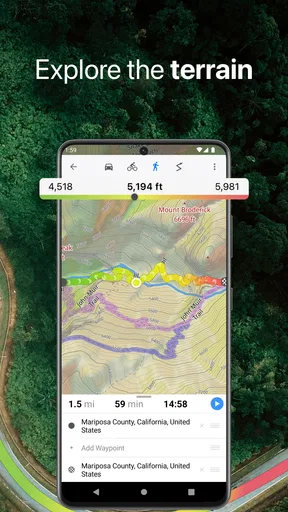
- Detailed hiking and cycling trails support outdoor route planning.
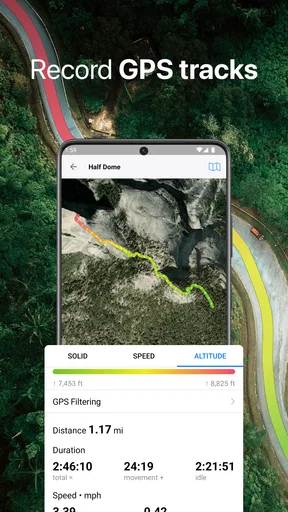
- Fast GPS tracking records routes with distance and elevation data.
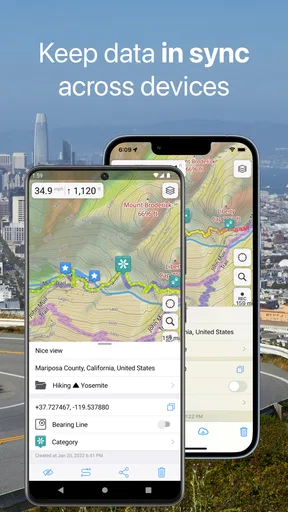
- Bookmarks and custom routes make favorite places easy to organize.
- Regular map updates help keep roads, trails, and points of interest current.
Limitations of Guru Maps Pro & GPS Tracker
- Many advanced features require purchasing the Pro version.
- Offline map downloads can consume substantial device storage.
- Map coverage and trail accuracy vary by country and region.
- Turn-by-turn navigation may feel less polished than major competitors.
- Battery use can increase noticeably during continuous GPS tracking.
Other Releases by Evgen Bodunov
View All
Guru Maps — GPS Route Planner
Travel & Local4.4
Similar Picks in This Category
View All
Uber - Request a ride
Uber Technologies, Inc.4.7


inDrive. Rides with fair fares
® SUOL INNOVATIONS LTD4.8

Yandex Go: Taxi Food Delivery
Mikromobilnost LLC Belgrade4.8

Bolt: Request a Ride
Bolt Technology4.8

Rapido: Bike-Taxi, Auto & Cabs
Rapido Bike Taxi4.8
Frequently Asked Questions
What is Guru Maps Pro & GPS Tracker used for?
Guru Maps Pro & GPS Tracker is an offline navigation and mapping app designed for driving, hiking, cycling, and other outdoor activities. After downloading map data, you can search for places, plan routes, record GPS tracks, save favorite locations, and navigate without relying continuously on mobile data. It is particularly useful for travelers who need dependable maps in areas with weak or expensive internet access.
Does Guru Maps Pro work without an internet connection?
Yes, one of the app’s main advantages is offline navigation. You can download maps for selected countries or regions before traveling and then use them without a live internet connection. GPS positioning itself does not require mobile data, although online functions such as updated map information, traffic details, synchronization, or certain searches may require connectivity. Always download and test the required maps before leaving.
What features are included in the Pro version?
The Pro edition is intended for users who need more than basic map viewing. Depending on the current version and platform, it may include offline maps, advanced route planning, turn-by-turn navigation, track recording, unlimited bookmarks, GPX import and export, and additional travel-oriented tools. Available features can change with updates, so it is worth checking the store listing and subscription or purchase terms before downloading.
Is Guru Maps Pro suitable for hiking and cycling, or only for driving?
The app can be useful for several types of travel, not just car navigation. Hikers and cyclists can use downloaded maps, elevation or route information where available, saved waypoints, and GPS track recording to follow or document journeys. However, route quality depends on the selected map data, and users should not treat the app as a substitute for outdoor preparation, local knowledge, a paper map, or emergency equipment.
How accurate and reliable is the GPS tracking in Guru Maps Pro?
GPS accuracy mainly depends on your phone’s hardware, satellite visibility, weather, battery condition, and surroundings such as buildings, forests, or deep valleys. Guru Maps Pro can record and display your position and tracks effectively, but occasional drift or delays are normal with smartphone GPS. For longer trips, enable location permissions correctly, download maps in advance, carry a power bank, and verify important routes before starting.
